Change Set Management for IBM Doors Next
Change sets are an important part of controlled requirements work in IBM Engineering Requirements Management DOORS Next. They allow teams to isolate related changes before those changes are delivered to a stream. But in larger configuration-enabled environments, the operational side of change sets can become difficult to manage. Open change sets accumulate, owners move to other work, and administrators are left trying to determine what is still active, what needs follow-up, and what can be safely discarded.
Softacus Change Set Management addresses that administration problem. The widget gives authorized administrators, configuration leads, and project leads a central view of manageable DOORS Next change sets, together with the context needed to review them. Users can narrow the scope, search the list, inspect the related RM configuration path, notify creators, and initiate controlled discard actions for selected entries.
The widget does not replace the native DOORS Next change-set workflow. Teams continue to create, work in, deliver, and discard change sets through the IBM configuration model. Softacus adds a focused management layer around the recurring governance and cleanup work that becomes harder as projects scale.
Why Open Change Sets Become an Administration Problem
IBM DOORS Next supports configuration-managed requirements work through concepts such as project areas, components, streams, baselines, and change sets. IBM documentation also describes permissions for managing change sets and the ability to link change sets to work items, including governance options that can require approved work items before delivery. These capabilities create useful control, but they also mean that administrators need a reliable way to understand the state and ownership of open work.
A change set that remains open is not automatically a problem. It may represent valid work in progress. The difficulty begins when the surrounding context becomes unclear. A creator may have forgotten the change set, moved to another assignment, or left the project. Multiple teams may be working across many components and streams. At that point, a simple list of names is not enough. The reviewer needs to know where the change set belongs, who owns it, and whether the appropriate next action is to wait, notify the owner, or discard it under the organization’s governance rules.
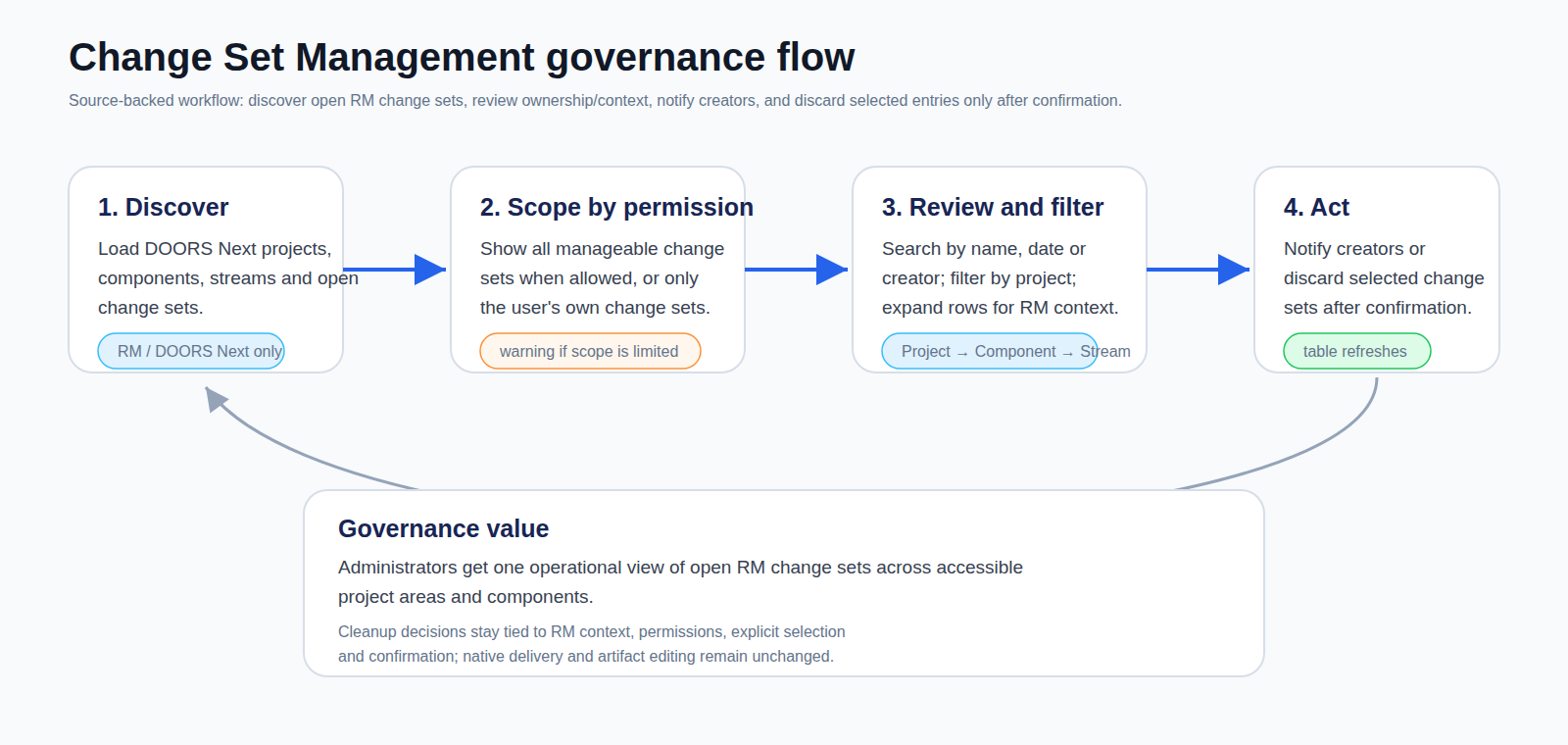
A useful management workflow therefore needs to answer four questions quickly: where the open change sets are, who created them, which project/component/stream context they belong to, and what action is permitted and appropriate.
A Central View for DOORS Next Change Sets
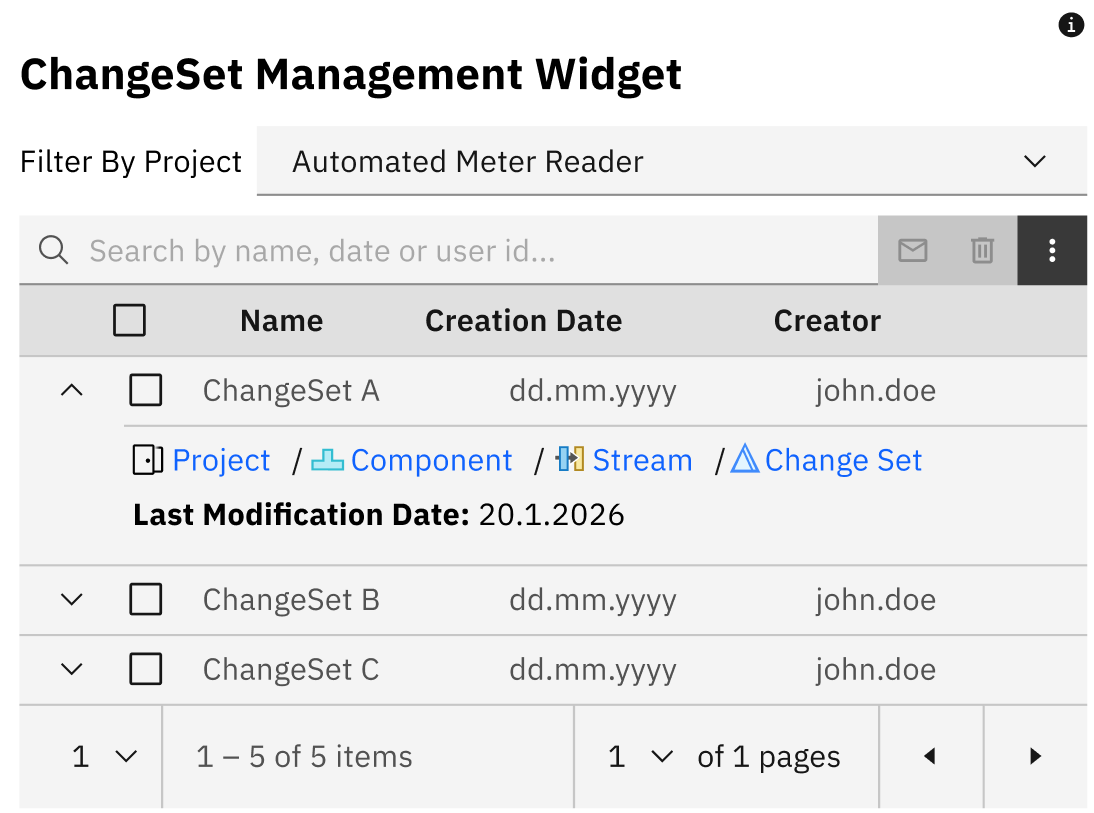
Change Set Management brings these questions into one operational view. The main table presents the change-set name, creation information, and creator, while filters and search help reviewers narrow a larger repository to the scope they actually need to manage. Selected rows can be used for supported bulk actions, and an expanded entry can expose the RM context behind the change set.

1.) Change Set Management Widget Overview
2.) Table actions and stream sorting
Permission-Aware Cleanup Instead of a Misleading Global List
Repository governance should respect the permissions already defined for the environment. The Change Set Management design therefore distinguishes between users who can manage broader team change sets and users whose permissions limit them to their own work. Where broader management permission is available, the widget can expose the change sets within the authorized project scope. Where access is narrower, the view is correspondingly limited and should make that limitation clear to the user.
This behavior is important for trust. A restricted user should not interpret an incomplete list as the complete state of the repository, while an administrator needs enough visibility to perform meaningful cleanup. Clear permission feedback makes the management view more reliable and keeps the widget aligned with the organization’s DOORS Next governance model.

3.) Change Set Management governance flow
Old does not always mean obsolete. Before discarding a change set, the better governance step may be to ask the creator to review it. Change Set Management supports an owner-notification workflow for selected entries so administrators can request that creators deliver, discard, or otherwise resolve their work.
A useful notification can include the change-set name, creation date, project, component, stream, relevant links, and a review deadline based on the organization’s configured review period. This turns cleanup into a repeatable process: identify unresolved entries, contact owners, allow time for action, and return later to deal with the remaining change sets.
Notify Owners Before Taking a Destructive Action
Old does not always mean obsolete. Before discarding a change set, the better governance step may be to ask the creator to review it. Change Set Management supports an owner-notification workflow for selected entries so administrators can request that creators deliver, discard, or otherwise resolve their work.
A useful notification can include the change-set name, creation date, project, component, stream, relevant links, and a review deadline based on the organization’s configured review period. This turns cleanup into a repeatable process: identify unresolved entries, contact owners, allow time for action, and return later to deal with the remaining change sets.
Controlled Discard for Selected Change Sets
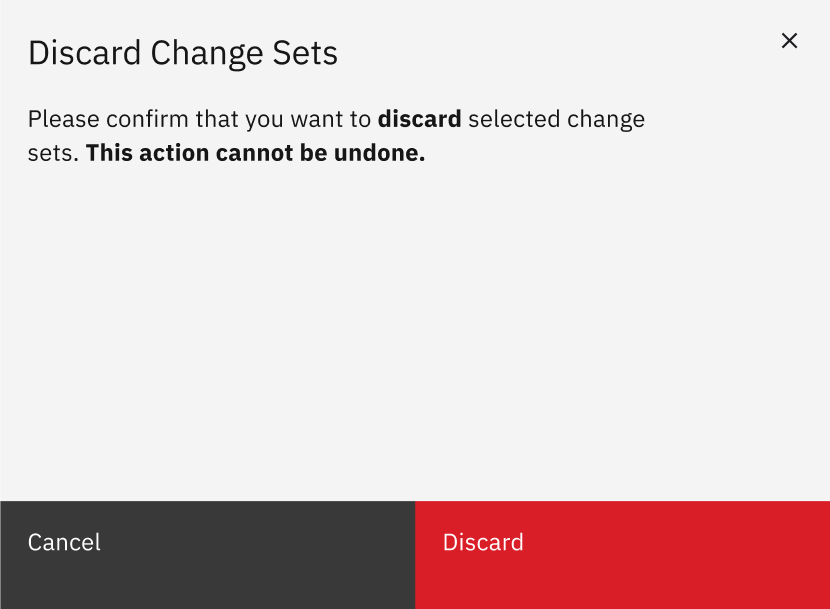
When a change set is confirmed as unnecessary and the user has the required authority, the widget can initiate a discard action for one or more selected entries. Because discard is destructive, the action should remain explicit and confirmation-based. The user sees what is being discarded and is warned that the operation cannot simply be undone.
After a successful discard, the management table should refresh so the visible state reflects the repository. For enterprise deployments, failure handling is also important: partial failures, unavailable services, or permission changes should be reported clearly rather than leaving the administrator uncertain about which actions succeeded.

4.) Discard confirmation dialog
How the Widget Fits the IBM DOORS Next Workflow
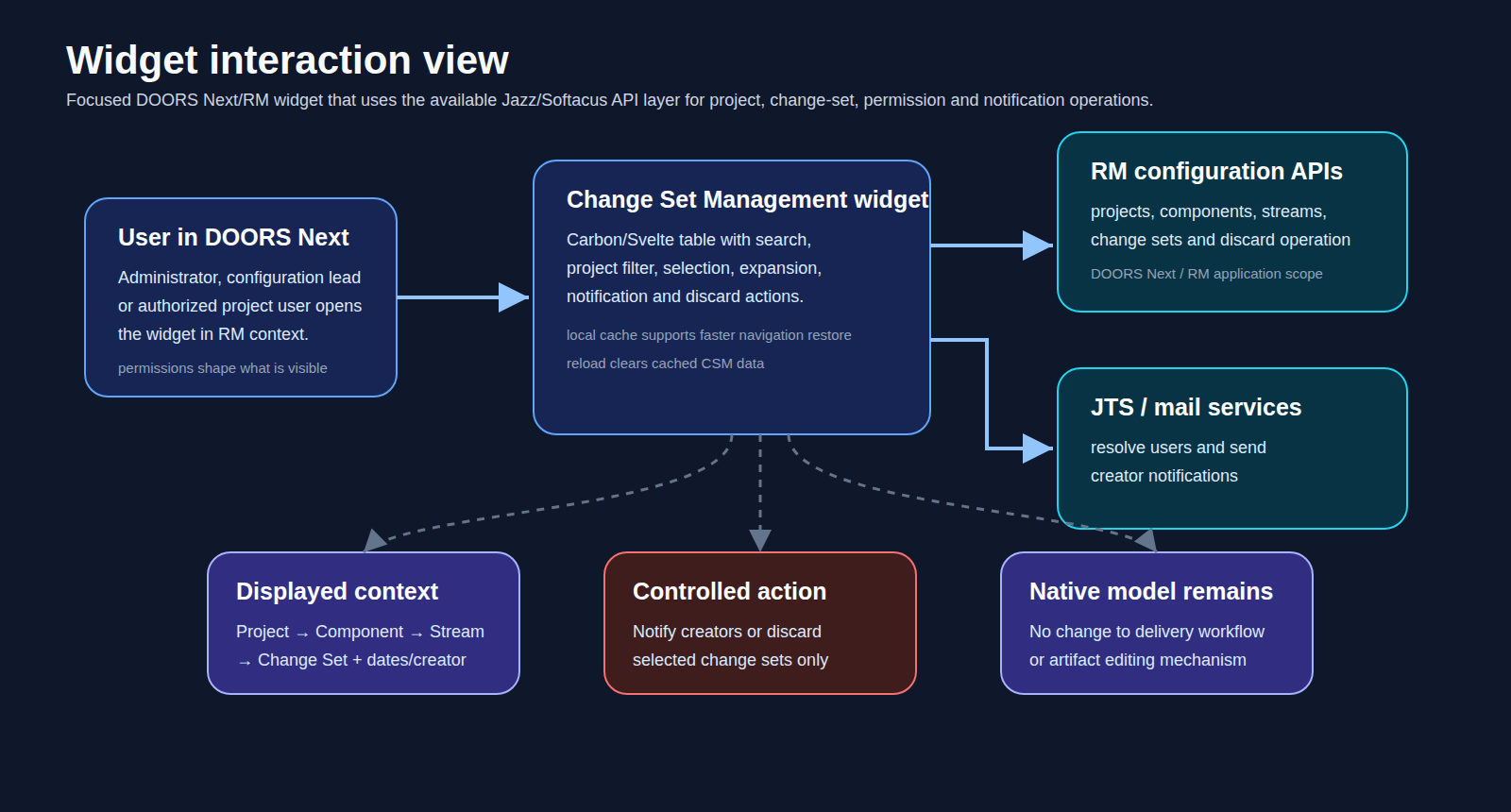
Change Set Management is designed as a focused DOORS Next/RM widget. It uses the project and configuration context available to the host environment, checks relevant permissions, and calls the available Jazz/Softacus service layer for the operations exposed in the interface. Its role is intentionally narrow: improve visibility and administration around change sets without becoming a separate configuration-management system.
Native DOORS Next remains responsible for the underlying configuration concepts and lifecycle. The widget is most useful as an operational layer for organizations that already depend on those capabilities but need a faster, more consistent way to govern the open-change-set backlog.

5.) Widget interaction view
How the Widget Fits the IBM DOORS Next Workflow
Change Set Management is designed as a focused DOORS Next/RM widget. It uses the project and configuration context available to the host environment, checks relevant permissions, and calls the available Jazz/Softacus service layer for the operations exposed in the interface. Its role is intentionally narrow: improve visibility and administration around change sets without becoming a separate configuration-management system.
Native DOORS Next remains responsible for the underlying configuration concepts and lifecycle. The widget is most useful as an operational layer for organizations that already depend on those capabilities but need a faster, more consistent way to govern the open-change-set backlog.
Where Change Set Management Helps Most
The widget is most valuable in configuration-enabled DOORS Next environments where several teams work across multiple project areas, components, streams, or product variants. In these environments, change-set cleanup is not a one-time migration task. It is recurring operational governance. Centralized discovery reduces hunting, contextual review reduces guesswork, owner notification encourages self-service resolution, and confirmation-based discard supports safer cleanup of entries that no longer need to remain open.
The result is not automation for its own sake. It is a clearer operating model for keeping configuration-managed requirements repositories understandable as they grow.
Practical Boundaries
The current product scope should be described as IBM Engineering Requirements Management DOORS Next change-set administration. The widget focuses on discovery, filtering, contextual review, notification, and administrative discard. It does not replace artifact editing, native delivery, or the underlying change-set mechanism.
Deployment details should be validated before publication or rollout, including supported IBM ELM versions, exact permission names, notification infrastructure, review-period configuration, API dependencies, and behavior when only part of a multi-selection action succeeds. Publishing these boundaries clearly will make the product page more credible and reduce ambiguity during customer evaluation.
Where Softacus Can Help
Softacus can help organizations turn change-set cleanup from an occasional manual exercise into a defined governance routine. The starting point is the Change Set Management widget itself: a centralized, permission-aware view that helps authorized users find open change sets, understand their RM context, contact owners, and carry out controlled cleanup without replacing native DOORS Next delivery behavior.
The value becomes stronger when the widget is implemented together with the customer’s real configuration model. Softacus can help map project areas, components, streams, roles, and permissions to the intended cleanup process; define which teams should have administrative visibility; configure practical review periods and notification content; and validate how destructive actions should be handled in the customer’s environment. This makes the solution part of an operating model rather than simply another dashboard.
Conclusion
Change sets are valuable because they give DOORS Next teams controlled spaces for related requirements changes. At scale, however, the backlog of open change sets can create its own governance workload. Softacus Change Set Management gives authorized teams a practical way to see that backlog, understand its context, involve the right owners, and perform controlled cleanup.
For organizations already using configuration management in DOORS Next, the strongest next step is a representative pilot. Choose a project area with real change-set volume, review the management view with configuration leads, and define the notification, permission, and discard rules that match the organization’s governance process.
Frequently asked questions
Sign up to our newsletter
Our Services
Our Extensions
Latest blog articles
Contact Us!
Softacus Services
We, in Softacus, are experts when it comes to consulting and service delivery of IBM software products and solutions in your business. We help our clients to improve visibility and transparency when licensing and managing commercial software, providing measurable value while increasing efficiency and accountability and we are providing services in different areas (see Softacus Services).
IBM ELM extensions developed by Softacus are free of charge for the customers who ordered IBM ELM licenses via Softacus or for the customers who ordered any of our services. If you are interested in any of our IBM ELM extensions, you found a bug or you have any enhancement request, please let us know at info@softacus.com.