An approved naming-policy change can leave a Jazz administrator with a list of existing user IDs that need new values. The task is specific, but the questions matter: which identity will be changed, what happens if a row fails, and how will the result be checked?
Softacus Jazz User ID Migration is a command-line solution for changing existing user IDs in the Jazz Team Server (JTS) repository. It combines reviewed CSV mappings, a default dry run, explicit authorization to apply changes and independent repository readback. It is intended for administrators who need a controlled repository maintenance workflow, not a replacement identity-management system.
Change the ID, keep the repository identity
The solution renames the existing repository user rather than creating a replacement account. For a successful change, it retains and verifies the same repository UUID: the underlying identity remains the same even though its user ID changes.
That distinction gives administrators a concrete acceptance check. The question is not simply whether the server accepted an update, but whether the requested ID belongs to the same repository identity afterward. UUID continuity is not a blanket guarantee about every linked artifact, project role or external integration; those concerns need their own acceptance checks where relevant.
From approved mappings to visible results
The workflow separates preparation, authorization and verification.
- Prepare the mapping. Supply a UTF-8 CSV containing the existing and intended user IDs. Select the mapping columns by their exact header names. Target IDs are explicit, not generated or normalized by the tool. An existing user list can be prepared as input, but the CLI does not perform a general user export. Unrelated columns are ignored; adding email, license or role data does not turn the file into a profile-update request.
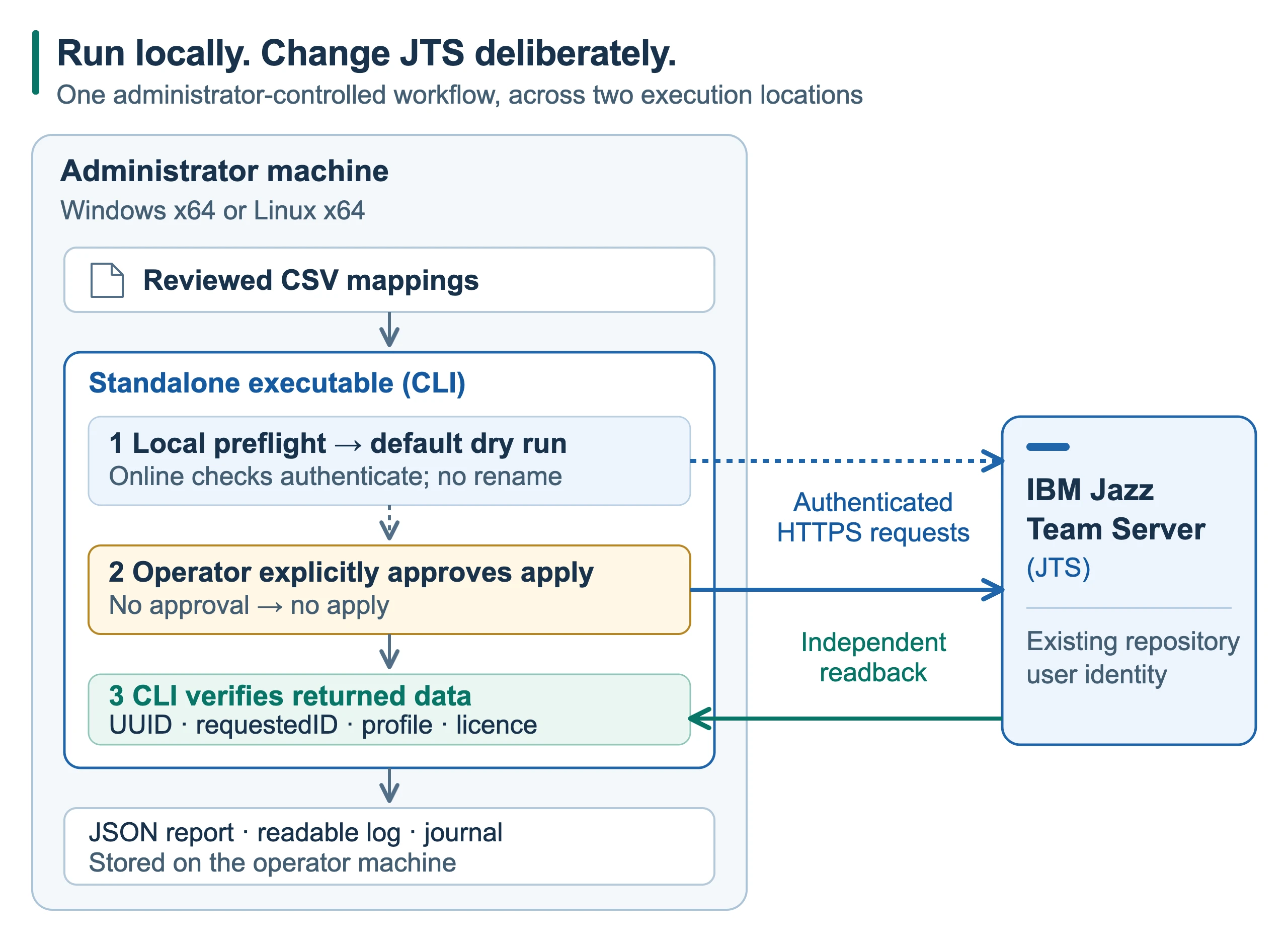
- Check before changing. Validate the input offline, then use the authenticated online dry run to inspect readiness and row-level problems. Dry run is the default and does not rename repository users. It can expose issues before approval, but it cannot promise that a later apply will succeed against changing server state.
- Apply deliberately. An administrator must explicitly authorize apply. The solution checks administrative identity and operating preconditions, refreshes the relevant user state before each change and records write intent in a durable journal. It does not enable global server settings on the operator’s behalf.
- Review the outcome. Attempted changes are independently read back and reconciled against the requested ID and existing repository UUID, with preservation checks on the observed profile and license data. Row-level results, a readable log and the write journal distinguish successful changes from failures and exceptions needing investigation.
A batch does not become successful merely because some rows passed. Independent row errors may allow other safe rows to continue; uncertain writes, failed preservation checks or global safety failures stop later writes. There is no automatic rollback or resume. Investigate an ambiguous result before attempting another change rather than blindly retrying the batch.
Run from Linux or Windows
Standalone Linux x64 and Windows x64 executables avoid a separate Bun, Node or Java runtime installation on the operator machine. This keeps receiving-machine prerequisites focused on the appropriate executable, access and environment configuration.
The executable runs on the administrator’s own workstation or admin machine with network access to JTS; it is not installed in JTS. Standard environment, authentication and certificate prerequisites still apply.

The CLI runs on the administrator’s machine, sends authenticated HTTPS requests to JTS and independently verifies readback. Apply requires explicit operator approval; reports, logs and the journal stay local.
HTTPS certificate verification is enabled by default, with custom certificate-authority support for internal environments. Treat mapping files and execution receipts as private administrative records: they contain identity and server information.
Qualify the environment, not just the CSV
Suitability depends on the JTS release, authentication setup, registry capabilities, permissions and the existing setting that allows user-ID modification. Review these before scheduling a change.
A repository rename does not rename or synchronize an external directory, merge accounts, verify login under the new ID or guarantee external group preservation. IBM’s user administration documentation explains the distinction between repository users and the external user registry. Directory coordination and login validation therefore remain separate activities.
More ways to manage Jazz users
Need to manage more than user IDs? We can discuss adding tools to:
- Update email addresses from a reviewed list.
- Export a user list so administrators can review it.
- Manage licenses: see which licenses users have and, where supported, add or remove them.
- Manage Jazz repository roles where your user registry allows it. This would not change project or team permissions.
These features are not included in the current script. We would first check what your Jazz setup and administrator permissions allow.
Discuss your migration with Softacus
Contact Softacus to assess your Jazz user-ID migration scenario. Bring your JTS release, registry and authentication setup, proposed mapping approach and required acceptance checks. The next step is to establish whether the controlled repository workflow fits your environment—and whether any additional administration needs should be scoped separately.
Sign up to our newsletter
Our Services
Our Extensions
Latest blog articles
Contact Us!
Softacus Services
We, in Softacus, are experts when it comes to consulting and service delivery of IBM software products and solutions in your business. We help our clients to improve visibility and transparency when licensing and managing commercial software, providing measurable value while increasing efficiency and accountability and we are providing services in different areas (see Softacus Services).
IBM ELM extensions developed by Softacus are free of charge for the customers who ordered IBM ELM licenses via Softacus or for the customers who ordered any of our services. If you are interested in any of our IBM ELM extensions, you found a bug or you have any enhancement request, please let us know at info@softacus.com.